Multi-study planner: plan and run multiple studies with different audiences

PRISMA is Synthetic Users' multi-study planner — a single interface to design, manage, and run multiple studies with different audiences simultaneously, without juggling separate projects.

PRISMA is our multi-study planner designed to streamline your research workflow by bringing all your studies into one visually intuitive interface. Instead of managing separate projects and data sources, you can oversee everything in a single, organized system—reducing complexity and saving you valuable time.


With PRISMA, you’ll quickly see how easy it is to tailor and expand your research. Whether you need to refine a specific audience segment, adjust the number of interviews, or add entirely new studies, you can do so without losing sight of the bigger picture. PRISMA’s node-based approach keeps your research visually organized and actionable, ensuring that you can adapt on the fly, stay aligned with your goals, and ultimately extract deeper insights across multiple studies. That's really the whole point of Synthetic Users: Better insights.

Video of this tutorial: https://youtu.be/Y_EfmZXGeWA

__wf_reserved_inherit

__wf_reserved_inherit

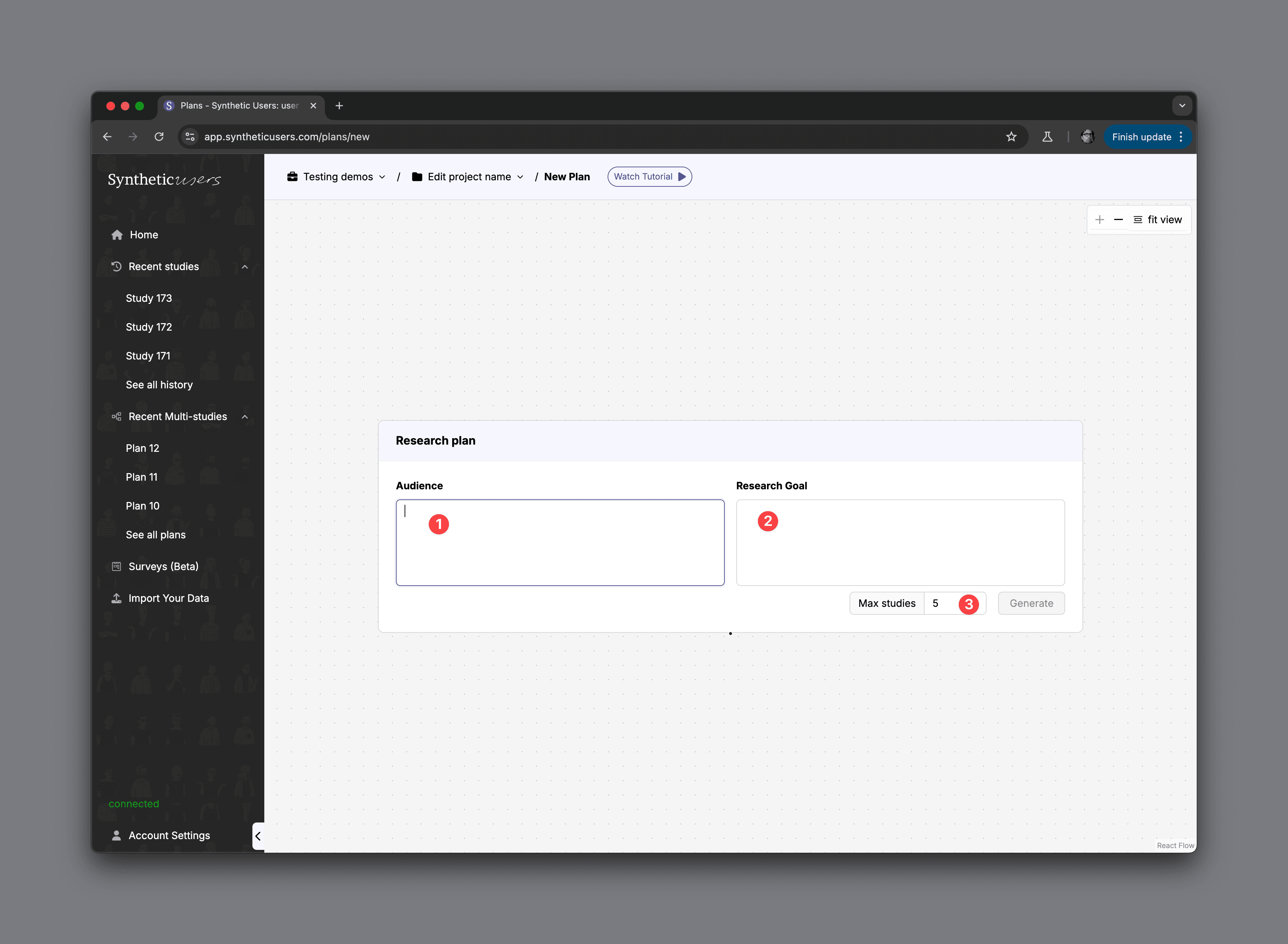
1. Audience

Enter the group or segment you want to study—such as “First-time car buyers” or “Singapore hybrid vehicle customers.” This field helps the system understand who you’re focusing on.

2. Research Goal

Describe what you want to learn or achieve—like “Identify barriers to purchase” or “Measure attitudes toward hybrid maintenance.” The clearer your goal, the more relevant the suggested studies will be.

3. Max Studies

Specify how many individual studies you’d like the planner to generate at once. If you want multiple perspectives on the same audience, increase this number. When you’re ready, click Generate to produce your multi-study plan.
__wf_reserved_inherit

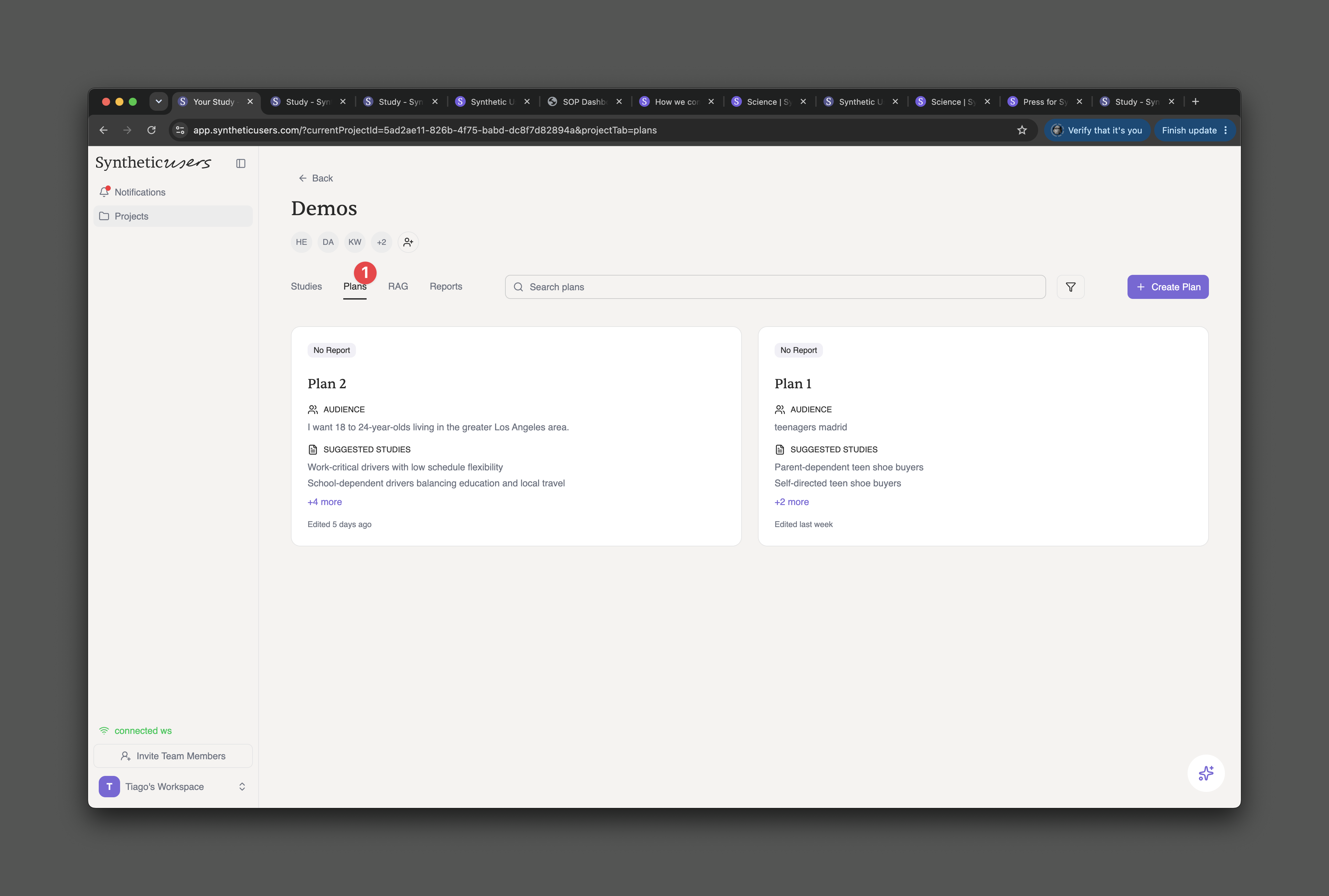
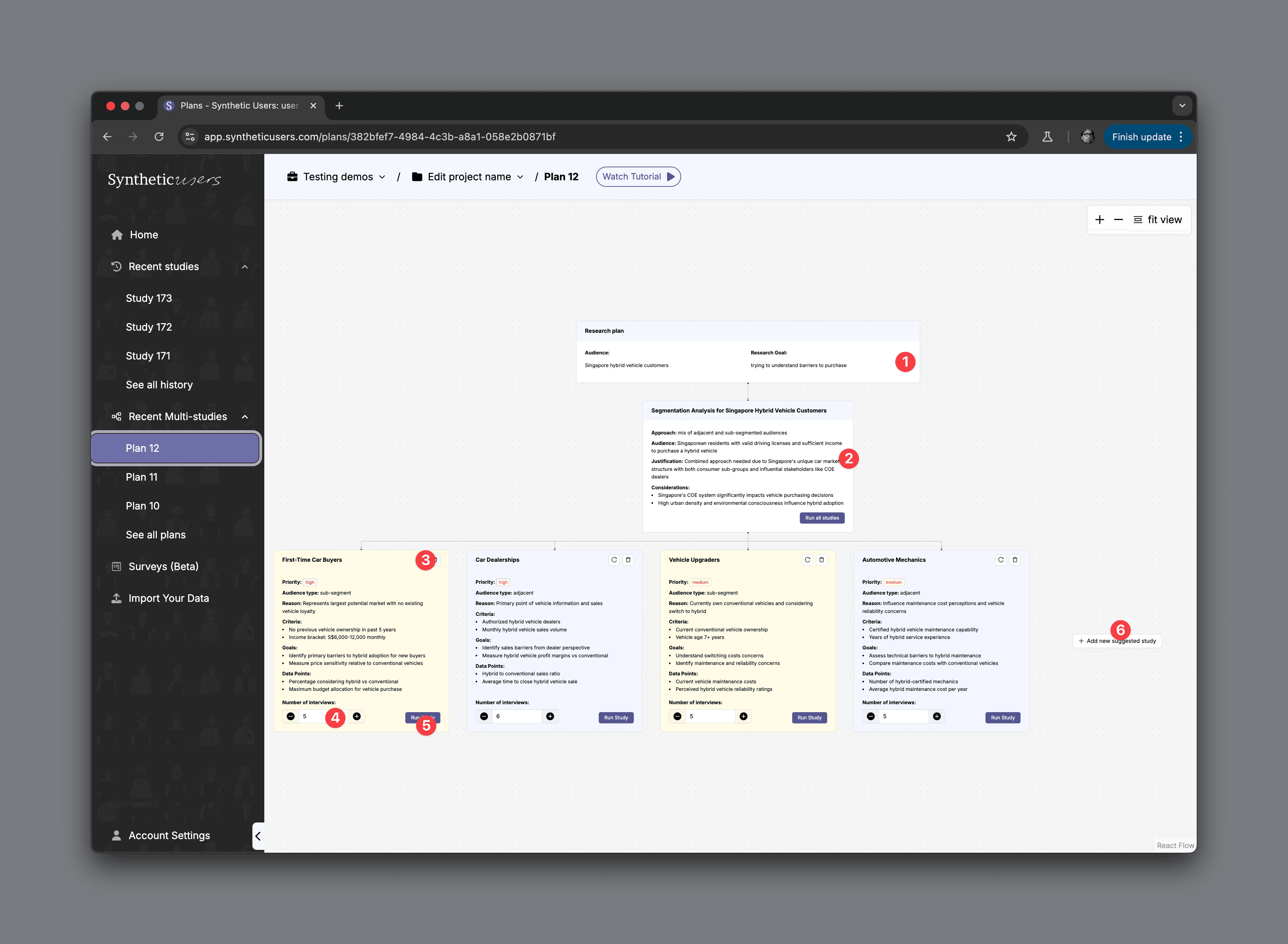
1. Research Plan

At the top, you’ll see your research plan, which displays the Audience (e.g., “Singapore hybrid vehicle customers”) and Research Goal (e.g., “trying to understand barriers to purchase”). This provides a high-level overview of what you want to accomplish.

2. Segmentation Analysis

Just beneath the research plan is a Segmentation Analysis card—here, you can explore different audience groups, sub-segments, or related markets. It summarizes your chosen approach, justification, and key considerations before you dive into individual studies.

3. Study Card

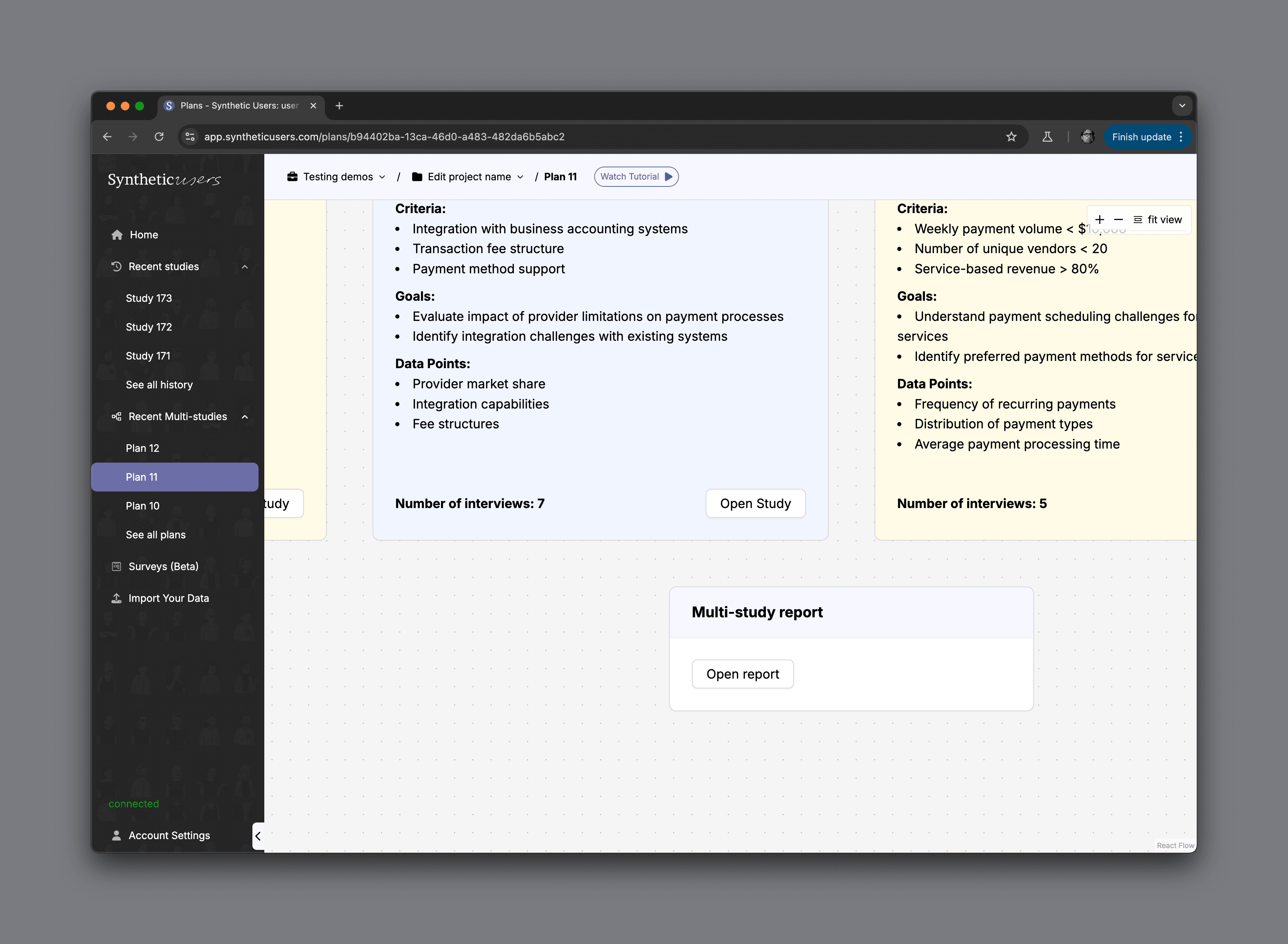
Each colored card—such as First-Time Car Buyers—represents a distinct study. It outlines essential information like priority, audience type, reason, criteria, and goals so you can keep track of how each study fits into your larger research plan.

4. Number of Interviews

Within each study card, you’ll see a “Number of Interviews” field where you can adjust how many interviews you’d like to conduct for that particular segment.

5. Run Study

After reviewing or refining a study card, click “Run Study” to launch that specific research track and begin generating synthetic user interviews or analysis.

6. Add New Suggested Study

If you want to broaden your research or explore a new angle, simply select “Add new suggested study.” This lets you quickly introduce more studies to your multi-study plan without disrupting your existing research framework.
__wf_reserved_inherit

Once you run your studies, you'll be able to generate the Global Report.

__wf_reserved_inherit

Global Report Overview

The Global Report is a comprehensive summary that synthesizes findings from all individual studies—offering a high-level narrative of the research process and the core insights generated. It begins by highlighting the Audience and Research Goal, ensuring clarity on the context and objectives of the overall research effort. A list of Included Studies (1) provides quick access to each specialized segment (e.g., High-Volume Retail, Payment Service Providers).

On the left sidebar, you’ll find a structured set of sections (e.g., Executive Summary, Thematic Analysis, Insight Synthesis, Strategic Implications, Conclusions) that walk you through the progression of the research. This organization helps you see how each study’s data contributes to larger themes, actionable insights, and strategic recommendations. Whether the focus is on pain points, market opportunities, or potential solutions, each section distills and interprets the findings in a concise, decision-ready format.

Finally, the Generate PDF option in the top-right corner allows you to export the entire report—making it easy to share key findings, contextual insights, and next-step recommendations with stakeholders or team members.

Releated Articles

More articles for you

Synthetic users, an intro

A quick video walkthrough introducing the Synthetic Users platform — covering key navigation and core features for new users getting started.

Introducing Iris

Introducing Iris, Synthetic Users' research agent. A tutorial on how to work alongside Iris to define study parameters, run interviews, and get precisely structured insight reports.

Multi-study planner: plan and run multiple studies with different audiences

PRISMA is Synthetic Users' multi-study planner — a single interface to design, manage, and run multiple studies with different audiences simultaneously, without juggling separate projects.

Enrich your Synthetic Users with your data. RAG tutorial.

Learn how to enrich Synthetic Users with your own data using Retrieval-Augmented Generation (RAG) to make AI participants more context-aware and accurate.

Synthetic Users Leadership Webinar: Mapping the Synthetic Research Industry

Recap of the Synthetic Users Leadership Webinar featuring Wikipedia founder Jimmy Wales — covering the state of AI, synthetic research risks, differentiators, and the road ahead.

Help! How do I go beyond the average with Synthetic Users?

How to move past generic insights with Synthetic Users by changing your research mindset, framing better goals, and probing deeper — just like you would with organic participants.

Features: Knowledge Graph, Cloning Research, Exporting Annotations, Searching inside History...

A roundup of four new Synthetic Users features: Knowledge Graph for visualising interview themes, Research Cloning, Annotation Exporting, and searching inside your research history.

What's new? 4 new features

A look at four new Synthetic Users features: a Research Assistant UI, expanded language support, and more — designed to help teams run better research faster.

Generating, Running and Sharing Synthetic Research. Really?

A step-by-step walkthrough of how to generate your Synthetic User panel, run interviews, and share your research — from setup to insights report

What to do when you feel your Synthetic Users are being too generalist

Three practical steps to get more specific, nuanced insights from Synthetic Users — including how to probe deeper, ask better questions, and when to complement with organic research.

Which interview type should I pick?

A guide to Synthetic Users' three interview types — dynamic script, custom script, and concept testing — and how to choose the right one based on your research goal.

Do annotations matter to researchers?

Why annotations are essential to research — from medieval monks marking manuscripts to modern researchers highlighting insights. How Synthetic Users brings annotation into AI-powered research.

The transition to Continuous Insight and where we excel

A look at four new Synthetic Users features: a Research Assistant UI, expanded language support, and more — designed to help teams run better research faster.

Don’t fall into the: “It’s not real. It’s just programming.“ fallacy.

Why dismissing AI-generated feedback as "just programming" is a mistake. The value of synthetic research lies in the insights it generates — not in the origin of the participant.

Products creating products

A reflection on how AI is transforming product development — and how Synthetic Users fits into a future where products help create better products through real-time synthetic feedback loops.

Synthetic Users: Merging Qualitative and Quantitative Research, in seconds.

How Synthetic Users blurs the line between qualitative and quantitative research — enabling teams to get the depth of qual at the scale and speed of quant, in seconds.

Signup to our newsletter

AI-powered user research platform that replaces traditional participant recruitment with synthetic agents. Get research-grade insights in minutes, not weeks.

© 2026 Synthetic Users Inc.

Signup to our newsletter

AI-powered user research platform that replaces traditional participant recruitment with synthetic agents. Get research-grade insights in minutes, not weeks.

© 2026 Synthetic Users Inc.

Signup to our newsletter

AI-powered user research platform that replaces traditional participant recruitment with synthetic agents. Get research-grade insights in minutes, not weeks.

© 2026 Synthetic Users Inc.